Some background process — a build, an encode, sixty browser tabs, a long-running AI coding session — is taking every core it can get, and the app in front of you is fighting it for CPU. ProcessX moves the hog into the macOS background band with one click. It keeps running. You get your Mac back. Fully reversible, no admin rights.
macOS already has the right mechanism built in — a background resource band where a process gets CPU, disk I/O and timers only when nothing in the foreground wants them. Almost nothing exposes it. ProcessX makes it a button.
Activity Monitor tells you which process is eating your machine and then offers you exactly one lever: kill it. So you either throw away a half-finished build, or you sit and wait while your cursor stutters.
renice looks like the answer until you try to undo it — an unprivileged user can raise a nice value but can never lower it again. One-way door.
One click drops the process into the macOS background band. It keeps running, keeps finishing your encode or your build — it just stops competing with the window you're looking at. Another click lifts it straight back out.
Built for the moment your Mac stops feeling instant — and for making sure that moment stops happening.
The panic button. One click sweeps every background hog into the low-priority band at once — known heavy agents plus anything else burning a quarter of a core in the background. Everything it did is listed in a toast, and Restore all undoes the lot.
Optional and off by default. Any background process that stays over the threshold for three consecutive samples gets moved down automatically — the classic runaway ffmpeg. Bring the app to the front and it's restored instantly.
When you need an actual number rather than a nudge: cap at 25% of a core holds an app's whole process group there. This is the one action that suspends — macOS offers no CPU quota, so a cap has to stop and resume the app on a duty cycle. Off by default, never the app you're using, never media or call apps, released the instant you bring it to the front, and it lets go of everything even if ProcessX is force-quit mid-cycle.
Chrome and its sixty helpers are one row, not sixty. And a terminal-hosted CLI session — an AI coding agent, a build, a dev server — surfaces as its own top-level row instead of hiding inside “Terminal”.
Expand a browser and the native app asks it over Apple Events for its actual open tabs by name — Chrome, Brave, Edge, Vivaldi, Opera and Safari. Slow the one runaway tab, jump to it, leave the rest alone.
Never the frontmost app. Never WindowServer, Finder or coreaudiod. Never Music, Spotify, Zoom, Teams or FaceTime. Never another user's processes. Never itself. Your call is never overruled by a heuristic.
The native build reads proc_pidinfo, host_statistics64 and IOKit directly — no subprocesses at all, every two seconds. A monitor that costs measurable CPU is a contradiction.
Same policy engine, same safety rules, two very different surfaces. Pick the one that fits how you work.
Live CPU in the menu bar; click for the full list. Reads the kernel directly — zero subprocesses, no HTTP server, no attack surface, no dependencies. Throttle state comes from the kernel's own pti_priority, so it can even detect when something else lifts a throttle you set.
A single Node file with no npm dependencies, serving a local dashboard on 127.0.0.1:4747. Handy on machines you don't want to build Swift on, and the reason the security model below exists.
Everything ProcessX does is reversible by construction, scoped to processes you already own, and recorded so that Restore only ever undoes ProcessX's own work.
The background band is a symmetric, unprivileged pair of calls — that is exactly why ProcessX uses it instead of renice, which you cannot undo without root. Every throttle is stored with its origin (manual, QuickFast or auto) so Restore never claims credit for a band the browser set on its own inactive tab.
Records are identity-guarded by executable path, so a recycled PID is dropped rather than acted on.
A server on loopback is still reachable from any page in your browser. So every state-changing request is gated by an Origin / Sec-Fetch-Site / content-type check, and every route validates the Host header — which is what stops a DNS-rebinding page from reading your process list.
Rate-limited writes, capped PID lists, no raw OS stderr in responses, CSP and nosniff on static files. There is deliberately no login: ProcessX can only do what you could already do from a terminal.
Both builds ship their own harness, and both of them throttle a sacrificial process the harness spawned itself to prove the kernel really moved it — and moved it back.
If you're weighing Activity Monitor, App Tamer, iStat Menus, Stats or just living in htop — here's an honest summary, including where the others are genuinely better.
| Tool | Price | Approach | How ProcessX differs |
|---|---|---|---|
| ProcessX | Free, open source | Moves processes into the macOS background resource band, reversibly — plus an opt-in hard CPU cap | Nothing is ever killed, and by default nothing is suspended either; one-click QuickFast for the whole system; an opt-in watchdog; an opt-in per-app percentage cap that is off by default; hard no-touch list for foreground, system and media apps |
| Activity Monitor | Built in | The definitive read-only view of what your Mac is doing | Excellent at diagnosis, and it has energy, disk and network tabs ProcessX doesn't. Its only intervention is Force Quit — ProcessX adds the reversible middle ground |
| App Tamer | ~$15 one-time | Stops and resumes CPU-hungry apps to hold them under a set percentage | App Tamer is mature and polished, and capping is what it is built around. ProcessX is free and open source, and its default action suspends nothing — it hands the decision to the kernel scheduler, so throttled work still runs flat out whenever the foreground is idle. ProcessX does now offer a hard cap using the same stop-and-resume technique, but as an opt-in that is off by default |
| iStat Menus | Paid | The best-in-class menu-bar system monitor | iStat Menus covers far more sensors — temperature, fans, network, battery, weather. It doesn't reprioritize anything; ProcessX is a smaller monitor that can act |
| Stats | Free (open source) | Popular open-source menu-bar monitor | Stats is a superb, mature monitor with far more modules. ProcessX overlaps only on the CPU glance and adds process-level reprioritization |
| htop · top · btop | Free | Terminal process viewers with a renice key | ProcessX keeps their per-process granularity, but uses the reversible background band instead of renice — and groups helper processes per app instead of listing all sixty |
| taskpolicy / renice | Built in | Command-line priority control | ProcessX is a GUI over exactly this mechanism, plus the parts a one-liner can't give you: finding the hog, refusing to touch what matters, remembering what it did, and undoing all of it at once |
| Turbo Boost Switcher · thermal tools | Free / paid | Reduce total CPU output to cut heat and fan noise | Those slow down the whole machine. ProcessX slows down one process so the rest of the machine gets faster |
People find ProcessX searching for: mac process monitor · why is my Mac so slow · how to fix a slow MacBook · limit CPU usage macOS · throttle a process on Mac · stop Chrome using so much CPU · macOS background band · taskpolicy · renice on Mac · deprioritize a process macOS · Activity Monitor alternative · free App Tamer alternative · iStat Menus alternative · mac menu bar CPU monitor · open source macOS process manager.
ProcessX was built end-to-end by a multi-agent framework: implementation, then an adversarial QA loop that ran fourteen find-and-fix iterations against its own automated harness, then a native rewrite that removed the whole subprocess layer.
Before any hardening, a zero-dependency harness was written that spins up its own server on a private port with an isolated state file, so tests could never touch a real machine's throttles. Everything after this is measured, not asserted.
Iteration 1 found a real hole: no Host validation, so a DNS-rebinding page could read the process list and issue writes. Iterations 5–9 found 28 WCAG contrast failures across both themes. Iterations 10–12 fixed responsive overflow and drove a real throttle round-trip through the DOM.
The Node build forked around eight processes every two seconds to answer questions the kernel will answer directly. The Swift rewrite replaced all of it with proc_pidinfo, host_statistics64, IOKit and NSWorkspace — and caught a mach-timebase bug that under-reported CPU by 41× on Apple Silicon.
Short, direct answers — for readers and for the answer engines that quote them.
macOS has a background resource band: a scheduling tier where a process gets CPU, disk I/O and timers only when nothing in the foreground wants them. ProcessX moves a chosen process — or a whole app group — into that band with one click, and lifts it back out with another.
The process keeps running and keeps making progress. It simply stops competing with whatever you're actually using. No admin rights are needed, because you can only affect processes you already own.
Because macOS schedules, by default, as though every process deserves an equal share. A build, an encode, sixty tabs or a long-running AI coding session will take every core it can get, and the window in front of you fights for the same cores. Quitting is destructive; pausing stops the work. Changing the priority is the option nobody exposes — so ProcessX exposes it.
Yes. App Tamer is a mature paid utility that holds an app under a CPU cap by repeatedly stopping and resuming it. ProcessX is free and open source, and its default action suspends nothing: it changes the scheduling band and lets the kernel decide, so a throttled process still runs at full speed whenever your foreground is idle. The native app also has a hard percentage cap, which necessarily works the same way App Tamer's does — it repeatedly suspends and resumes the app. It is off by default, set per app from a menu, never applied to the app you're using, to system processes or to media and call apps, and released the moment you bring the app to the front. A suspended app can't respond while it's stopped, so reach for "Slow down" first and the cap only when you need a specific number.
Because it's a one-way door. An unprivileged user can raise a nice value but can never lower it back without root — so you could slow a process down and then be unable to undo it. The background band (taskpolicy -b, or setpriority with PRIO_DARWIN_BG) is symmetric for the same user, and it throttles disk I/O and timer coalescing as well as CPU. That reversibility is the entire reason ProcessX is built on it.
None of the three. No password prompt, no daemon, no kext. It only changes the priority of processes owned by the user running it — exactly what that user could already do from a terminal.
Yes. Expanding a browser row lists its renderer processes, and in the native app scriptable browsers — Chrome and its Chromium siblings, plus Safari — are asked over Apple Events for their real open tabs by name, with a Jump button to switch to one. macOS will ask your permission the first time. Non-scriptable browsers such as Firefox still expand to renderer PIDs.
The frontmost application, including a command-line tool running in the frontmost terminal; protected system processes such as WindowServer, Finder and coreaudiod; media and call apps such as Music, Spotify, Zoom, Teams and FaceTime; processes owned by other users; and itself. Auto-tame is off by default, and everything QuickFast does is listed and undoable in one click.
No. No telemetry, no account, no network calls. The native app reads process information straight from the kernel. The optional local web app binds to 127.0.0.1 only and validates the Host, Origin and Sec-Fetch-Site headers on every route, so no web page — not even one pointing its own domain at loopback — can read your process list or throttle anything.
The native menu-bar app targets macOS 26 and is built with a Swift 6.2 toolchain. The local web app needs only Node 18 or later and runs on any recent macOS. Both are universal across Apple Silicon and Intel; the CPU accounting is explicitly mach-timebase corrected, so Apple Silicon reports true percentages.
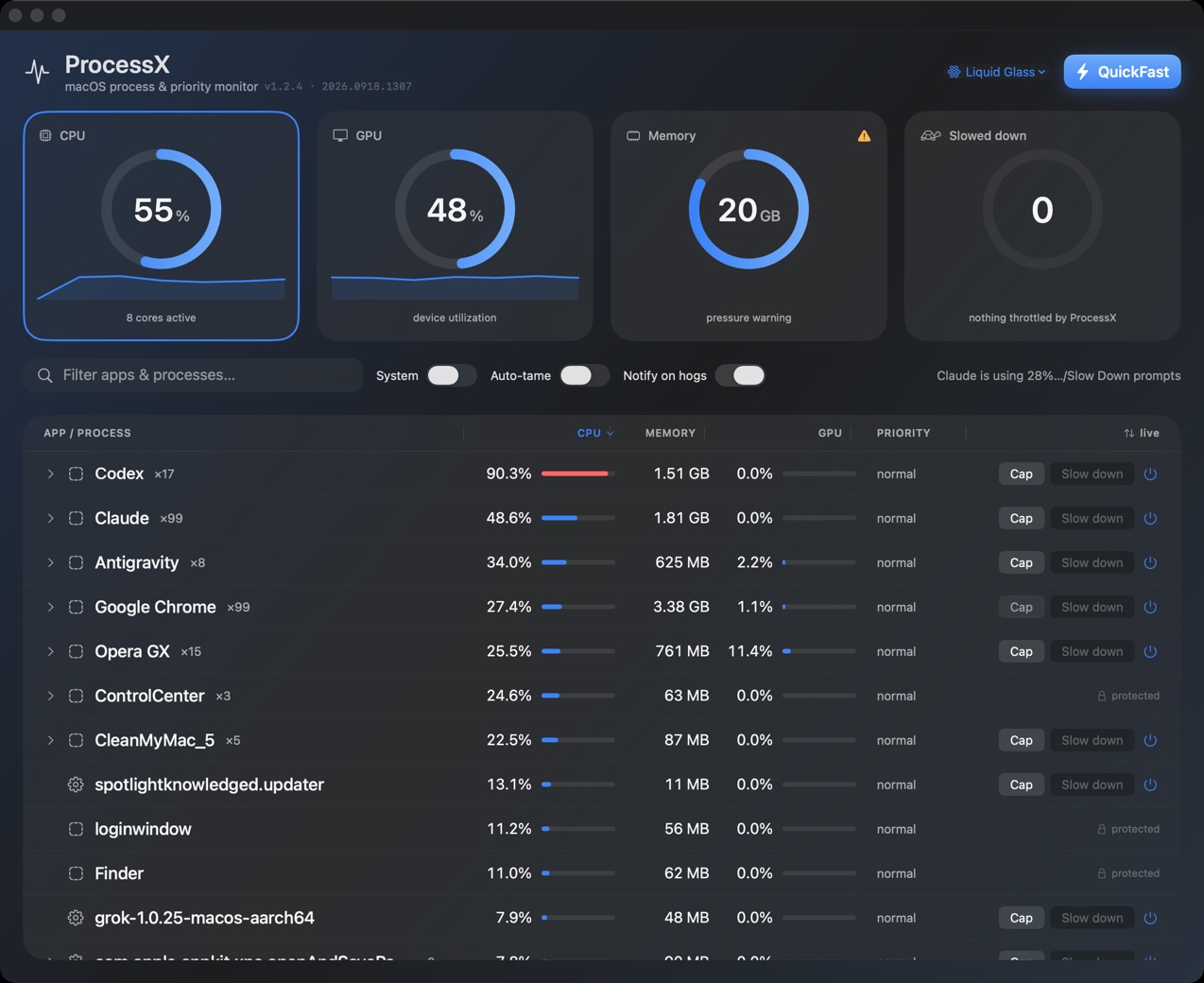
Free and open source. No installer, no admin rights, no telemetry — and every change it makes is one click away from being undone.
Download the notarized build — universal (Apple Silicon and Intel), signed and notarized, so it opens with no Gatekeeper warning. Unzip, drag to Applications. Requires macOS 26.
Or build it yourself with a Swift 6.2 toolchain — bundle.sh produces the same universal bundle, signed with whatever identity you have:
Node 18 or later. No npm install step — there are no dependencies to install.
Expanding a browser row to see its real tab names asks macOS for Automation permission the first time. Decline it and the row falls back to renderer PIDs — nothing else changes.